
Browse a source: one site, its own filters
This is the tab you'll use most. Choose a site, and the filter panel shows what that site can really filter by.
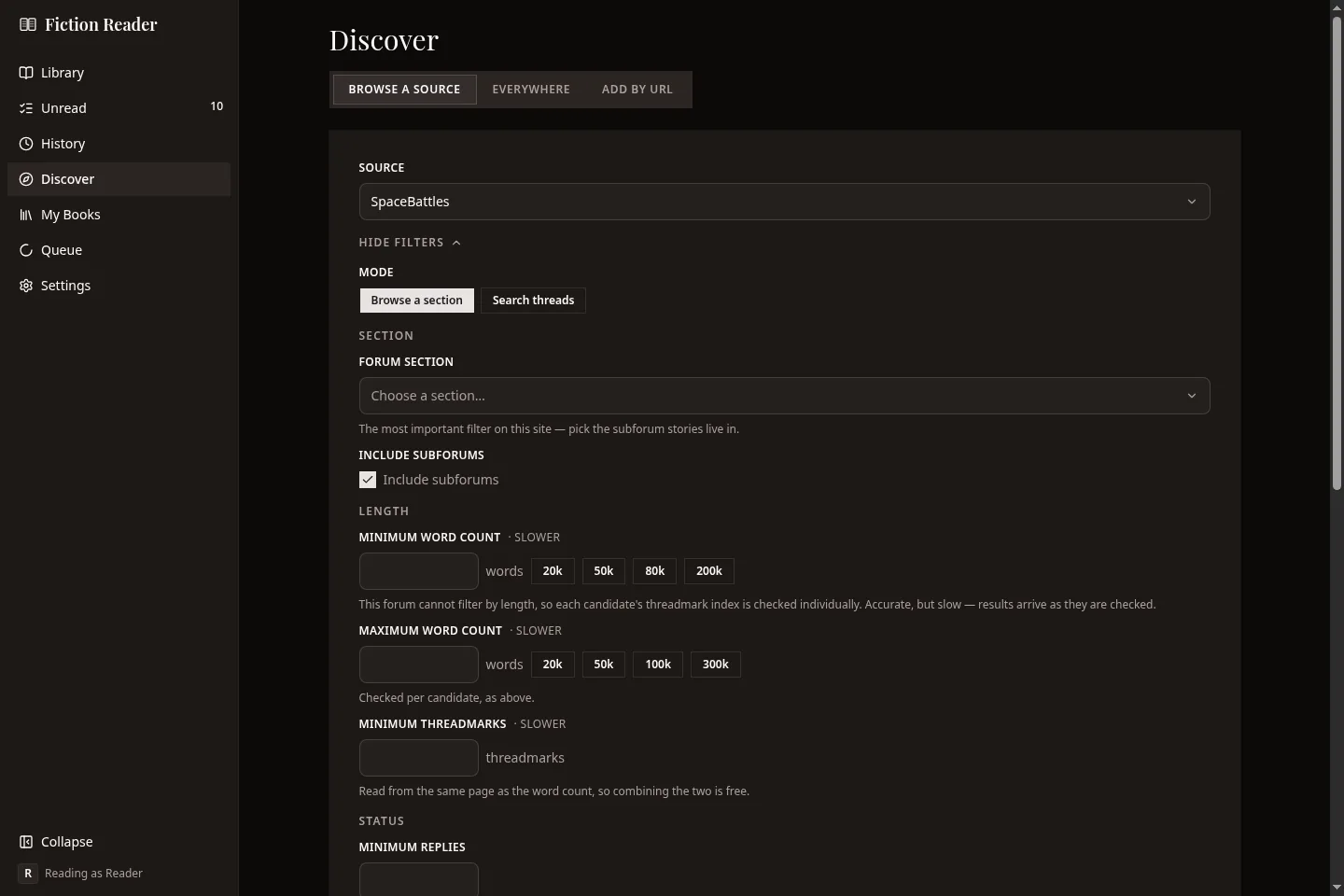
Every site is different. Royal Road has lists such as Best Rated, Trending and Rising Stars, plus genres, tags and content warnings. AO3 has fandoms, relationships, ratings and kudos. The forums start with a section, such as Creative Writing on SpaceBattles or User Fiction on Sufficient Velocity.
Filters marked "slower"
Sometimes a site can't filter on what you asked for. A forum listing might not say how many words a thread has, for example. Fiction Reader then checks each candidate one at a time, which costs a request per story. Those filters are marked slower, and results appear as they're checked. If the search uses up its request budget before the page is full, the list ends with Keep looking.
The panel folds away
On a forum the panel has a couple of dozen controls, so once results arrive it folds down to a single Filters (2) row with Search again beside it. The number is how many filters you've set.
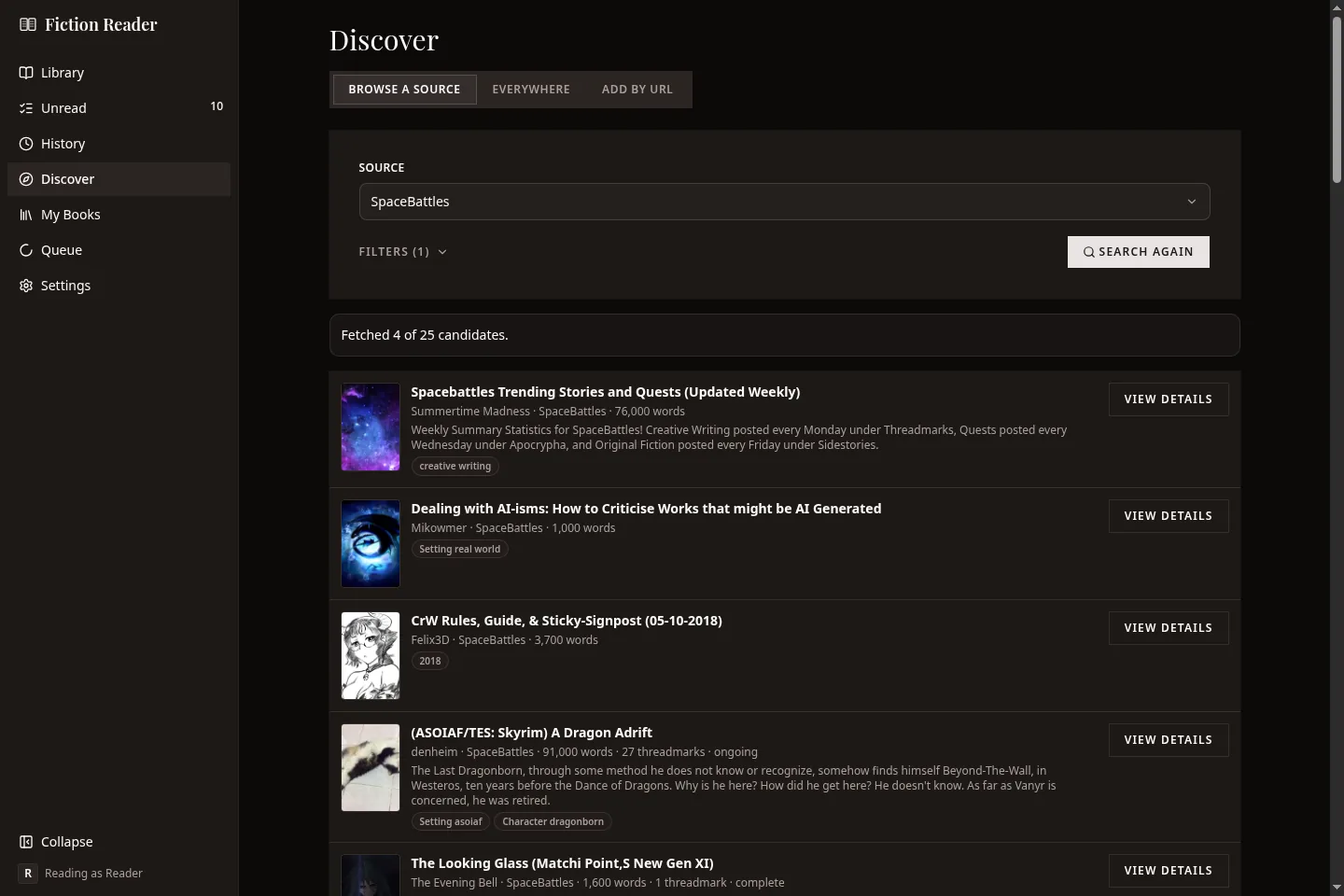
View details opens the story's details and the subscribe form. Stories you already follow are marked In library.
Under the results, Remember these filters keeps the panel filled in for that site the next time you open Discover.
Saved presets
If you run the same search often, save it. Set the filters the way you want them and press Save as preset. A preset keeps the filters, the mode and the sort order for one site. It doesn't keep the search term.
Pinned presets appear as buttons above the filter panel, so running one takes a single press. Manage lets you reorder, unpin and delete them. Presets are saved with your profile.
Sites change their filters now and then. If a preset uses something the site no longer offers, it's marked as needing a look, and the app asks you to check it before it runs.
Everywhere: several sites at once
One search box, sent to every site you've turned on that can be searched. The results come back in one list.
A line above the results says how each site did: either how many results it gave, or why it couldn't answer. If one site needs an account or is refusing requests today, you still get the results from the others.
There are no filters on this tab, because every site has different ones.
Add by URL: pasting a link
Paste a story or thread address and press Look up. This is the most reliable way to add a story, and the only way on FanFiction.net, which can't be searched.
If the address isn't from a supported site, the app says so.
Adding several at once
Under the URL box, Add several at once takes a whole list. Paste a favourites export, a bookmarks file or a page of links, and press Recognise them. Fiction Reader picks out the story addresses. Nothing is fetched at this point.
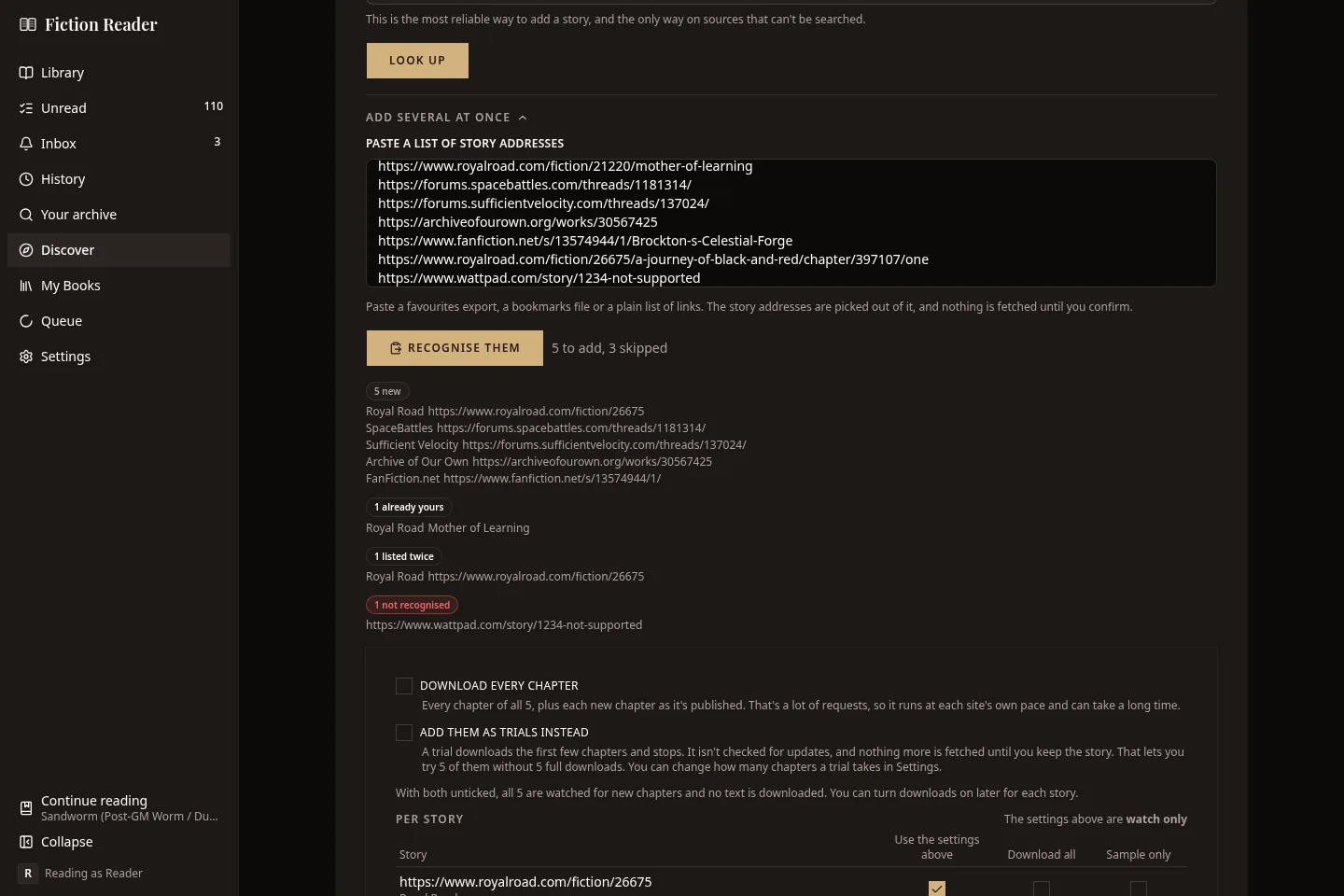
The list is sorted into groups: new stories, ones you already follow, duplicates, stories from a site you've switched off, and addresses it didn't recognise. Then you choose what to do with the new ones:
- Download every chapter. For a long list this is a lot of requests, and it runs at each site's own pace.
- Add them as trials instead. Each story gets its first few chapters and nothing more until you decide to keep it.
- Neither. The stories are followed for new chapters and no text is downloaded. This is the default, and you can turn downloads on later for each story.
Below that there's a row for every story, in case a few of them should be handled differently from the rest.
Once you confirm, the stories are added one at a time in the background, and a progress card shows how far it's got. Anything that fails is listed with the reason.
This isn't available in the Android app when it's using its own library.
The subscribe form
You can change everything on this form later from the story's own screen.
| Control | What it does |
|---|---|
| Browse and sample | Look through the chapter list and read a chapter or two before you subscribe. |
| Content to download | Forum threads only. Which of the author's extra threadmark lists to include. See below. |
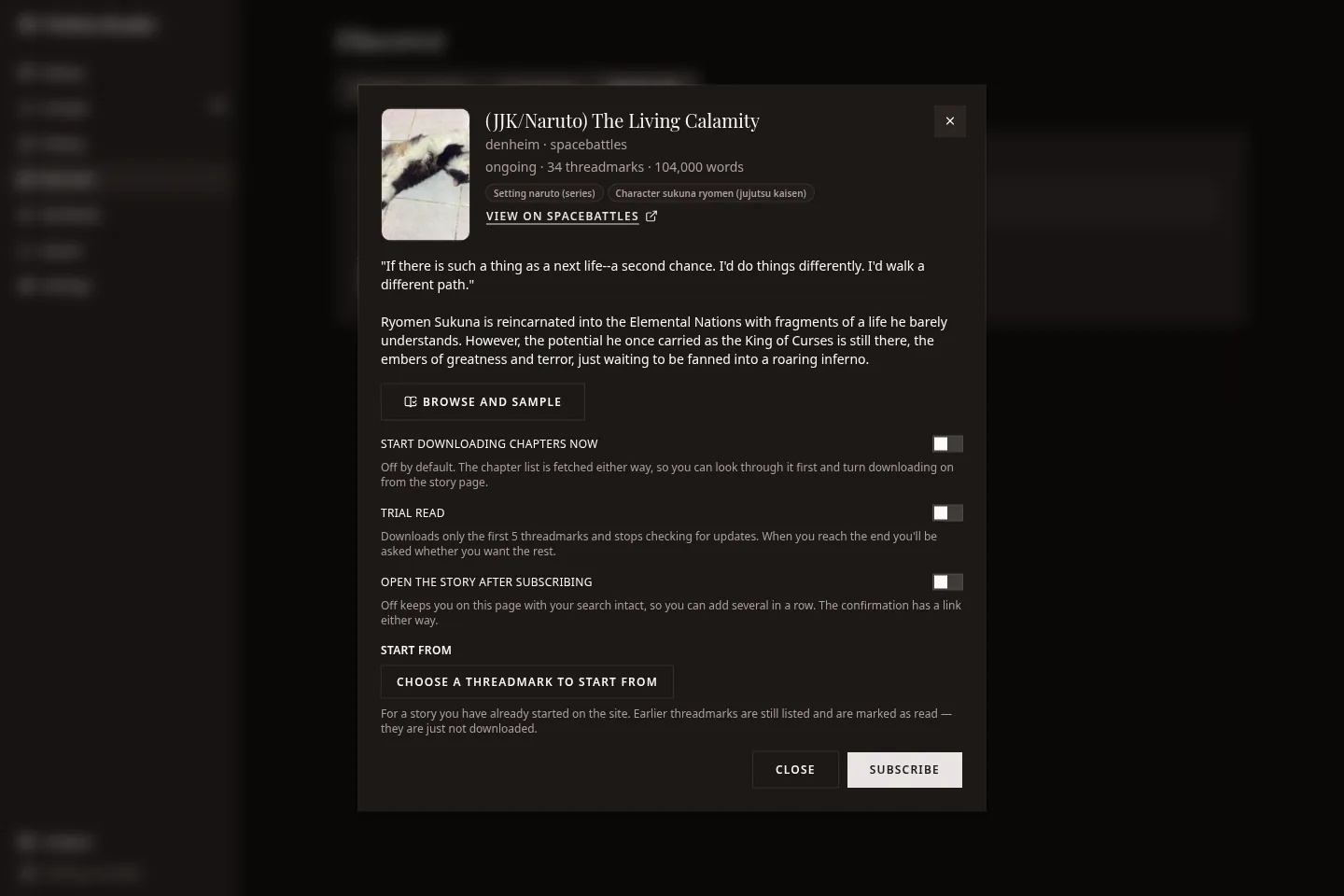
| Start downloading chapters now | Off by default. The chapter list is fetched either way, so you can look through a story first and turn downloading on afterwards. |
| Trial read | Downloads only the first few chapters. See below. |
| Open the story after subscribing | Turn it off to stay on the results, which is handy when you're adding several stories in a row. |
| Start from | For a story you've already read part of somewhere else. See below. |
Trial read
A trial downloads the first five chapters and stops. The story isn't checked for updates until you decide to keep it.
Trials are for working out whether you like a story. Without one, finding out means downloading the whole thing, and on a four-hundred-chapter thread that's hundreds of requests for something you might drop after a chapter.
A trial shows in your library with a Trial ribbon. When you finish the fifth chapter, the reader tells you it's the end of the trial and offers to fetch the rest. The story screen has the same offer as Download the whole story.
Unread counts on a trial only cover the trial. A five-chapter trial of a sixty-chapter thread shows five unread.
You can change how many chapters a trial takes, and make trials the default, in Settings → Downloads.
Starting part-way through
Start from is for a story you've been reading on the site itself. Listing the chapters costs a request, so it starts as a button. Press it and it becomes a picker.
| Choice | What happens |
|---|---|
| The beginning | Everything is downloaded and nothing is marked read. |
| Up to date, all read | Everything published so far is marked read. Only new chapters count as unread. |
| A specific chapter | Downloading starts there. Earlier chapters are marked read and stay in the list, and you can still download any of them one at a time. |
Threadmark categories
On SpaceBattles, Sufficient Velocity and Questionable Questing, a story is a forum thread and its chapters are threadmarks. Authors often keep extra threadmark lists beside the story, for side stories, informational posts, artwork and so on. The names are whatever the author chose.
The story's own threadmarks are always downloaded. The extra lists are tick boxes, on the subscribe form and on the story's screen, so you can add one later.
Extra lists never count as unread.
Why downloads take a while
Fiction Reader asks each site for one page every few seconds. The exact rate is on each site's card in Settings. A four-hundred-chapter thread takes well over half an hour, and that's normal.
These sites are run by people, mostly for free. Downloading ten times faster costs them ten times as much, and it's a good way to get blocked. The Queue screen shows what's downloading and what's waiting.
Some sites also check now and then that a person is reading. When that happens, Fiction Reader puts the request aside and tries again later, starting at fifteen minutes. You don't need to do anything.
Subscribing from the site itself
The optional browser extension puts the subscribe form behind a toolbar button, so you can add the story you're looking at without opening Fiction Reader. It has the same options.