
Finding a setting
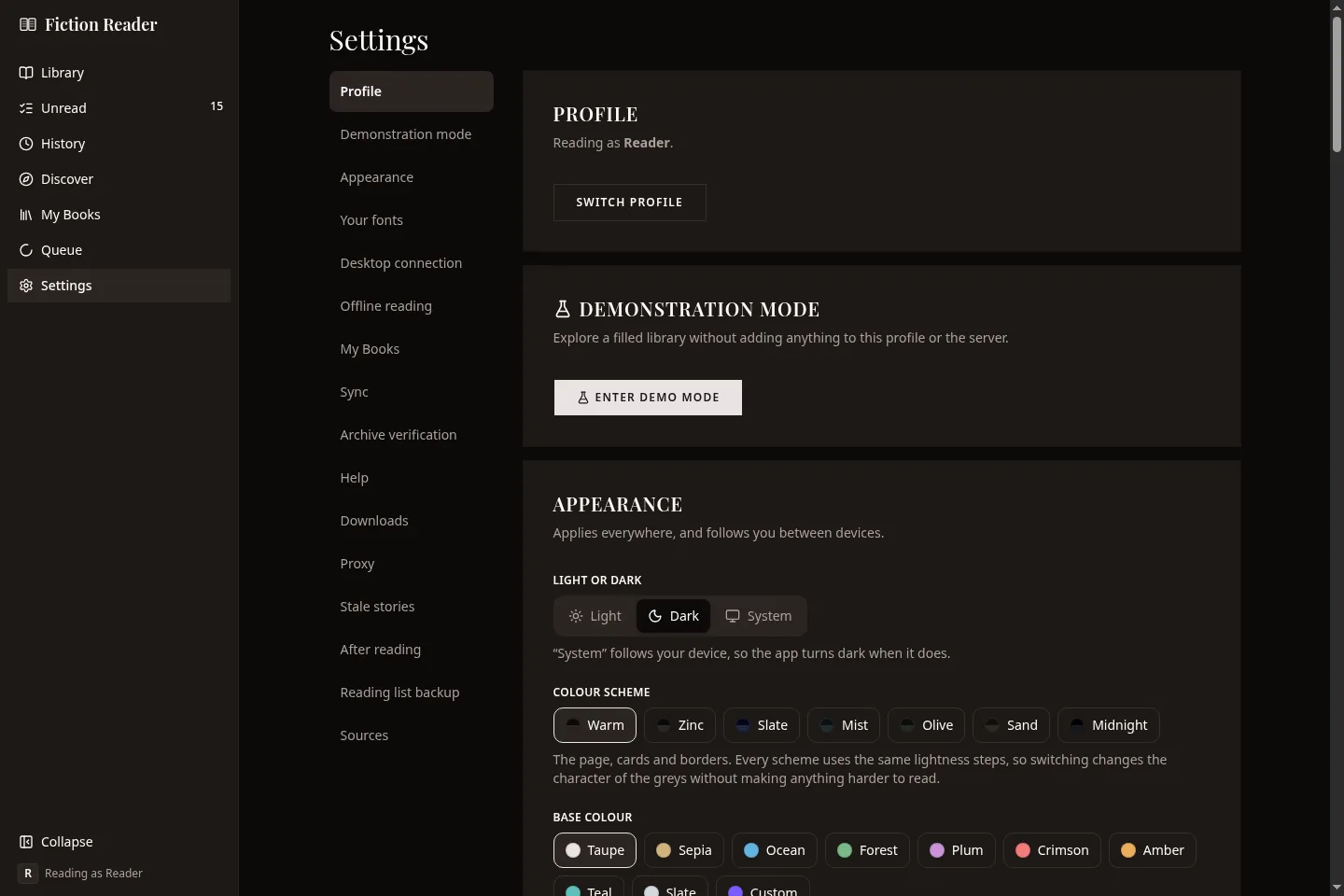
Choose a section in the list to jump to its card. Because it's all one page, your browser's find works across every setting.
Some sections don't apply to every way of running the app. Those are greyed out in the list, and their card says which version of the app has them. The table at the end lists them.
Profile
Shows who you're reading as, with a Switch profile button. Most settings on this page belong to the profile, so check this first on a shared machine.
Demonstration mode
Fills the app with made-up stories, books and progress so you can look around a full library. Nothing reaches the server or your real profile while it's on, and leaving it puts everything back.
Appearance
Applies to every screen and follows your profile between devices.
- Light or dark, or System to follow your device.
- Colour scheme. The colour of the page, cards and borders: Warm, Zinc, Slate, Mist, Olive, Sand or Midnight.
- Base colour. The colour of buttons, links and highlights. Nine to choose from, or Custom.
Fonts and spacing for reading aren't here. A button on this card opens the reading settings, which is where they're set.
Your fonts
Install your own TTF, OTF, WOFF or WOFF2 files and they appear in the reading view's font list. They're stored with your profile and travel with it through sync and library exports.
Desktop connection
Desktop app only. Switches between the library on this computer and a Fiction Reader server. It checks the address and access token before saving, then restarts the app. Your local library isn't touched while you use a server, so you can switch back.
Offline reading
Desktop and Android apps only. The mode (Automatic, Work offline or Off), what's saved on this device and how much space it uses, a space limit, and how many changes are waiting to be sent. See Reading offline.
My Books
- Turn on My Books. Takes effect straight away.
- Folder. Where the files are kept. It's fixed if the server's configuration sets it.
- Show My Books in the sidebar. Only changes your own sidebar.
- The number of books, the disk space they use, and the trash.
- Look for new books.
More on My Books.
Sync
Desktop app, and the Android app with its own library. Which service is connected, when this device last synced, your other devices, what's included, and any error, along with Sync now and Disconnect. See More than one device.
Notifications
Server and desktop. Where to send a message when something happens, how often, which events, and quiet hours. See Notifications.
Archive search
Server and desktop. How many chapters are indexed for archive search, and a button to rebuild the index. Rebuilding doesn't change anything you've downloaded.
Archive verification
Server and desktop. Checks that this machine still has every chapter and image the database lists. It only reports problems. Nothing is repaired or deleted automatically.
- Quick check. Every file exists and is the right size. It doesn't check the contents.
- Deep check. Reads every file and verifies its contents. This takes a while on a large library.
- Quick check weekly. Off by default.
After a check you get the counts, the first two hundred findings, and where the full report is saved. From there you can re-download damaged chapters or clear out files that nothing refers to.
Help
Show me around again replays the guided tour.
Downloads
- Simultaneous downloads. How many chapters are fetched at once. Each site's own pacing still applies on top.
- Trial read by default. Ticks the trial box whenever you subscribe. See Trial read.
- How much a trial downloads.
- Check for new chapters in the background. Android only. See The Android app.
- Debug mode. Adds a read-only database browser to the sidebar.
Proxy for downloads
Server and desktop. Loads the same PAC file your browser uses, so the server routes its requests the same way. It's for sites that refuse the server's location, which are usually image hosts.
Upload the file or give its address. Check an address tells you whether a given address would go through the proxy.
Stale stories
How long a story can go without a new chapter before the library marks it stale: one month, three, six, a year, or a number of days. Nothing happens automatically. You get a badge and a filter. Trials and archived stories are never counted.
After reading
What happens to a chapter's downloaded text when you finish it: Keep it (the default), Ask me, or Delete it.
Only the text is deleted. The chapter stays in the list, stays marked read, and can be downloaded again. This never applies to your own books.
Reading list backup
Server and desktop. Saves a plain-text file listing every story you're subscribed to, with its link and the last chapter you read. You can save one now or have it done on a schedule. If you ever stop using Fiction Reader, that file is enough to pick your stories back up in a browser.
Sources
One card per site. Each shows the site's name, its on/off switch, whether you're signed in, and its pacing in words. A site that's on but still needs an account opens by itself.
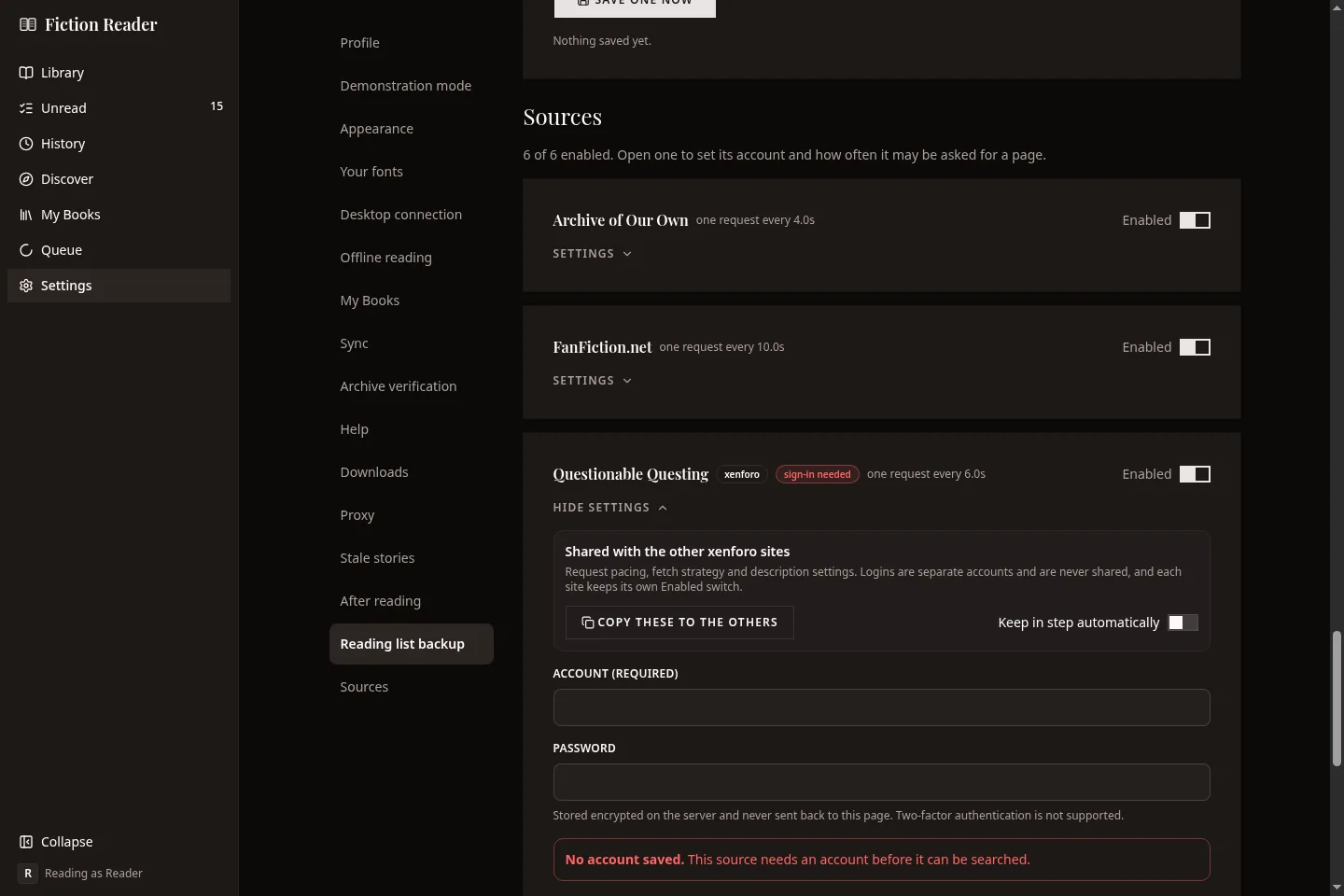
Inside a card
- Account. Username and password, with a separate Sign in button. The password is never shown back to you. Two-factor authentication isn't supported.
- Request pacing. Requests per minute, burst, and minimum gap, with a summary of what they add up to.
- Retries. How many more times a request is tried after it times out, loses its connection or gets a server error. The default is 2 and the most is 5. An anti-bot check or a request to slow down isn't retried this way. Those wait and are tried again later.
- Descriptions. Whether to fetch several descriptions at once while browsing. On a forum each description is a separate request.
The three forums run the same software, so one button copies pacing and related settings between them, and a switch keeps them in step from then on. Accounts and the on/off switch are always per site.
FanFiction.net's card says whether a browser is available to fetch it with. On a server that means the browser image.
Which cards you can use
| Card | Where it works |
|---|---|
| Desktop connection | Desktop app |
| Android connection | Android app |
| Offline reading | Desktop and Android apps |
| Sync | Desktop app, and Android with its own library |
| Notifications, Archive search, Archive verification, Proxy, Reading list backup | Server and desktop |